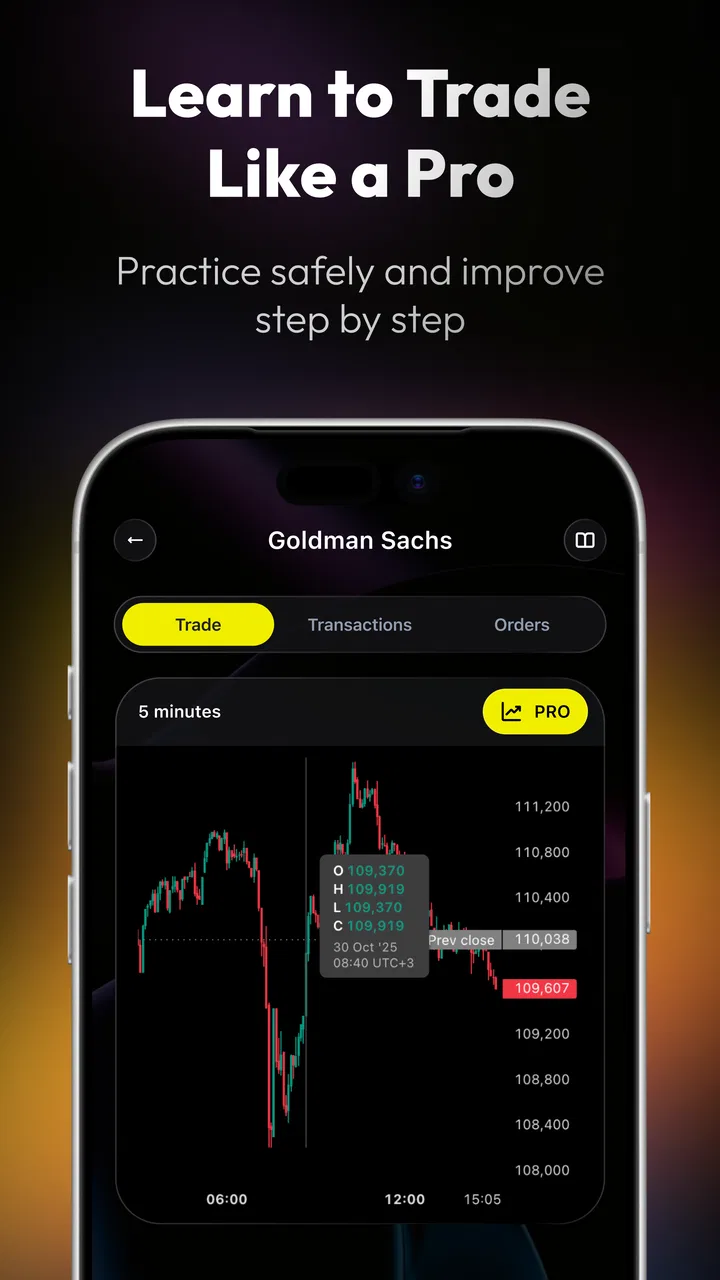
TradingGuru: Trading Simulator
- 4.7
- Rating
- 500.00K
- Installs
- Free
- Price

 Analysis by App-foxy
I approached TradingGuru: Trading Simulator as a learning tool rather than a shortcut to market profits. That distinction matters. A finance app can look reassuring while still encouraging rushed decisions, so my first question was whether this one helps a beginner slow down, test ideas, and understand risk before using real money. My overall impression is cautiously positive: it is best viewed as a practice environment for building trading habits, not as a replacement for research, financial advice, or a regulated investment account.
The app is free to download and is published by Crypto Guru Trading Academy and Simulator. It sits in the finance category, carries a Mature 17+ age rating, and its current release is version 1.0.7. Its audience is clearly people who want to become more comfortable with trading concepts, particularly through simulation instead of immediately placing live orders.
Its public reception is encouraging, with a 4.7 average from around 4.3 thousand ratings and more than 500 thousand installs. Those figures suggest that many people find the concept useful, but they do not prove that the app is suitable for every financial situation. I would still judge it by how well it supports careful decisions, how clearly it separates practice from real investing, and how much control it gives the person using it.
You May Also Like

 Google Keep - Notes and lists
Google Keep’s Quiet Growth Shows the Appeal of Simpler Notes
As mobile work gets busier, Google Keep keeps winning a simple contest: capture a thought quickly, find it later, and get on with the day.

 Blood Strike: 2.5 Anniversary
Blood Strike’s Loadouts Turn Every Drop Into a Tactical Gamble
A close look at Blood Strike’s custom loadouts: how fast access to signature weapons reshapes its battle royale rhythm, rewards preparation, and narrows the gap between fights.

 Pandora - Music & Podcasts
Pandora’s Music Is Easy to Start, but Harder to Recover
Pandora’s strength is its low-effort path from a seed to a station. Its weak spot is how much confidence it asks you to place in connection, setup, and quiet recovery.

 8 Ball Pool
 Is Built on Rivalries, Rematches, and Routine
A close look at the rivalries, rematches, shared routines, and unanswered safety questions that turn a quick pool match into a persistent mobile community.

 Samsung Music
’s Quiet Strength Is Playing What You Already Own
Its reach comes less from spectacle than from dependable access to a personal library. That simplicity is both the app’s strongest retention engine and its ceiling.

 AccuWeather: Weather Radar
AccuWeather Review: A Quick, Clear Forecast for Everyday Decisions
For everyday plans, the best forecast is the one you can understand quickly. AccuWeather makes rain timing, radar, and local conditions easy to act on, with a few trade-offs.
More From Our News Desk



What the simulator is really useful for
The strongest reason to use TradingGuru is that it gives you a place to rehearse a trading process. New traders often focus on finding the “right” asset or predicting the next move. In practice, the harder challenge is following a plan consistently: deciding why to enter, defining what would invalidate the idea, choosing a sensible position size, and reviewing the outcome without changing the story afterward.
A simulator can make those steps easier to see. I found the concept most valuable when treating each practice trade as a small experiment. Before taking an action, I would write down the reason for it in plain language, identify the risk I was accepting, and decide what result would make me close the position. That approach turns the app from a guessing game into a notebook with consequences.
This is particularly helpful for someone who has watched trading videos but has never had to make a decision under pressure. Reading about stop-losses, diversification, or emotional discipline is not the same as trying to follow those ideas. A simulated environment lets you discover whether your plan is too complicated, whether you react impulsively to a losing position, or whether you enter trades simply because the market appears active.
A realistic everyday use case would be a student or full-time worker who has twenty minutes in the evening. Instead of opening a live brokerage account after seeing a social-media tip, that person could use the session to review a setup, record an entry idea, and return later to assess the result. The important benefit is not a virtual win. It is learning whether the user can maintain a repeatable routine when there is no immediate financial damage.
Building a routine instead of chasing excitement
I recommend creating a simple weekly rhythm. Use one session to study the idea you want to test, another to make only a small number of deliberate practice decisions, and a later session to review what happened. Avoid changing several variables at once. If you alter the asset, timeframe, entry rule, and exit rule together, you will not know what actually improved your results.
One less obvious advantage of simulation is that it exposes the difference between being correct and being disciplined. A trade can make money even when the reasoning was poor, while a well-planned trade can lose because markets are uncertain. If you judge yourself only by the simulated balance, you may learn the wrong lesson. I would instead track whether you followed your written rule, respected your planned risk, and avoided adding to a position merely because it moved against you.
That is also where the app’s limitations become important. A simulator cannot fully reproduce the emotional effect of losing money you need for rent, the pressure of a sudden market move, or the practical details of executing a live order. A successful practice run should increase your understanding, not your confidence beyond what the evidence supports.
Who will benefit most, and who should look elsewhere
TradingGuru is a good fit for beginners who want a low-pressure introduction to trading decisions. It can also help an experienced investor test a broad idea before committing real capital, provided the user treats the results as rough practice rather than proof of a profitable strategy. People who learn best by doing may get more from it than from passive articles alone.
I would be more cautious about recommending it to anyone looking for personalized financial guidance, live portfolio management, tax planning, or a complete investment research platform. A simulator is not the right substitute for a brokerage account when your goal is to buy actual securities, and it is not the right substitute for a qualified adviser when your circumstances are complicated.
It may also disappoint users who want immediate excitement. The educational value comes from restraint, repetition, and review. If you only want rapid signals or a stream of trade ideas, a simulator may feel slow because it places the focus on your process rather than promising certainty.
Trust, controls, and moments that deserve attention
With any finance app, I think trust should be evaluated through visible choices rather than assumptions. The developer is identified as Crypto Guru Trading Academy and Simulator, and the app is clearly presented as a trading simulator. That framing is useful because it sets an expectation of practice rather than direct access to your bank account or an investment portfolio.
Still, I would read every screen carefully before entering personal information. Pay attention to whether the app asks for an account, what information is requested, and whether each permission appears relevant to the task you want to perform. A user should not grant access automatically just because an app is popular. If a request is unclear, pause and decide whether the feature is worth the extra exposure.
The same caution applies to any sign-in or profile setup. Use a unique password if an account is required, and avoid sharing sensitive financial credentials with a learning tool. A practice app should not need the same access as a banking application. I would also check the device’s permission settings after installation, especially if the app requests access that does not seem connected to simulation or education.
Data-sensitive moments usually occur when an app moves from anonymous browsing into account creation, saved progress, notifications, or external links. Those are the points where I would slow down. Read the wording on each consent screen, look for optional choices, and distinguish between a setting needed for the app to work and one intended for convenience or promotion.
I also prefer to keep notifications limited. Trading-related alerts can create a false sense of urgency, particularly for beginners who already feel pressure to act. If the app offers notification controls, I would choose only the reminders that support a study routine and disable anything that encourages constant checking. A learning schedule is healthier than reacting to every prompt.
Keeping control of the learning process
User agency is not only about privacy settings. It also means deciding what the app is allowed to influence. I would set a clear boundary before beginning: no simulated result will be treated as a promise, and no practice decision will automatically justify a real-money trade. That boundary prevents a lucky result from becoming an impulsive financial commitment.
Another useful habit is to separate education from promotion. If the app presents market language, strategy suggestions, or invitations to explore additional material, ask what decision you are being encouraged to make. Is the message helping you understand risk, or is it pushing you toward more activity? The difference may be subtle, so I would keep a written objective for each session and stop when that objective is complete.
For people concerned about account control, I recommend reviewing the profile and settings areas before spending much time inside the app. Know how to change available preferences, remove optional permissions, and sign out. If you stop using the app, uninstalling it is only one step; also review any account or notification settings you created and remove information you no longer want associated with the service.
I would not enter real financial account details merely to unlock a more convenient learning experience. A simulator should remain separate from the accounts that hold your money. If a future workflow ever asks for sensitive credentials, verify why they are needed and whether the same learning goal can be achieved without providing them.
How it compares with ordinary alternatives
Compared with a spreadsheet, TradingGuru should feel more approachable for someone who does not yet know how to structure a trading journal. A spreadsheet offers greater flexibility and makes it easier to calculate custom measures, but it requires you to design the entire method yourself. The app’s appeal is the guided nature of practicing decisions without first building a system from scratch.
Compared with a standard brokerage app, its advantage is separation from immediate financial consequences. A brokerage is necessary for real transactions, account funding, order execution, and portfolio management, but those capabilities can tempt an inexperienced user to act before learning the basics. TradingGuru is the better starting point when the goal is rehearsal rather than ownership.
Compared with market-news and charting applications, the simulator is more useful for testing behavior than for gathering a broad stream of information. A news service may offer deeper reporting, while a charting platform may provide more technical tools. I would use those alternatives when researching markets in depth, but I would return to a simulator when I wanted to test whether I could follow a defined plan.
That comparison reveals an important trade-off: convenience versus control. A dedicated learning app can make practice less intimidating, but a custom journal can capture details that a guided product may not. If you already maintain a disciplined trading log, the app may add less value unless its simulation workflow helps you test a specific weakness.
Practical ways to avoid misleading results
My first tip is to begin with a fixed rule set and resist the urge to optimize after every outcome. If a practice trade loses, do not immediately rewrite the rule so the next example would have succeeded. Review a meaningful group of decisions instead. This reduces hindsight bias and gives you a clearer picture of whether the method is workable.
My second tip is to record the emotional trigger behind each action. Note whether you entered because of a clear setup, fear of missing out, boredom, or frustration after a previous loss. That information is often more valuable than the simulated result. A person who identifies repeated impulse entries can work on the real problem before moving to a live account.
My third tip is to test inactivity as part of the strategy. Beginners often assume that a good trader must always have a position. Deliberately passing on uncertain situations can show whether your process allows patience. If the app makes it easy to act, your discipline may be tested more by choosing not to trade than by choosing an entry.
Finally, compare your simulated assumptions with real-world constraints before drawing conclusions. Slippage, fees, liquidity, taxes, market hours, and order execution can change the result of a live strategy. Even if the app helps you understand direction and timing, those practical factors may make a simulated approach less attractive outside the practice environment.
My cautious verdict
I see TradingGuru: Trading Simulator as a useful first step for people who want to practice trading without immediately putting money at risk. Its strongest contribution is behavioral: it can help you form a repeatable routine, recognize impulsive decisions, and learn to judge a trade by its process rather than by one lucky outcome. The free price also lowers the barrier for someone who wants to explore the subject before choosing a brokerage service.
My recommendation comes with firm limits. Keep personal data to the minimum needed, review permissions and account choices deliberately, and treat every simulated result as educational. Do not connect sensitive financial credentials casually, and do not interpret practice success as evidence that you are ready to risk money.
The app is not the best choice for live investing, detailed financial planning, or advanced market research. A brokerage, spreadsheet, charting tool, or professional adviser may be more appropriate depending on the goal. But for a beginner who wants a controlled place to rehearse decisions and examine trading habits, this finance app is worth trying with a skeptical mindset. Its real value appears when you use it to become slower, clearer, and more accountable—not when you use it to chase the feeling of being right.
FAQs for TradingGuru: Trading Simulator
01What is TradingGuru: Trading Simulator, and who is it designed for?
TradingGuru: Trading Simulator is an educational app that lets users practice trading in a simulated environment rather than placing real orders with actual money. It is mainly designed for beginners who want to understand market basics, order execution, price movements, and portfolio management. More experienced users may also use it to test ideas, although simulated results should not be treated as proof of future performance.
02Can I make or lose real money while using TradingGuru?
No, the app is intended for simulated trading, so transactions are generally made with virtual funds instead of money from a real brokerage account. This makes it useful for learning without immediately taking financial risks. However, users should still approach the experience responsibly, because virtual trading may not fully reproduce emotions, fees, slippage, liquidity limitations, or other conditions encountered in live markets.
03Does TradingGuru provide real-time market data and realistic trading conditions?
The realism of the experience depends on the market data, instruments, and simulation features available in the version you install. Some information may be delayed, simplified, or presented for educational purposes rather than professional trading. Before relying on the app for analysis, check its data update policy, supported assets, trading hours, virtual commissions, and whether simulated prices accurately reflect the markets you want to study.
04Is TradingGuru suitable for learning cryptocurrency, stock, or other financial markets?
TradingGuru can be useful for practicing general trading concepts, but the exact markets and instruments supported may vary by platform and app version. Users should review the available asset list before downloading if they specifically want stocks, cryptocurrencies, forex, or another category. The app can help explain strategies and risk management, but it is not a substitute for regulated financial education or professional investment advice.
05What should I know about purchases, advertisements, privacy, and account requirements?
Before installing TradingGuru, review its current store listing for advertising, optional subscriptions, in-app purchases, login requirements, and data-collection details. Some features may be restricted unless you create an account or upgrade to a paid plan. Avoid entering sensitive brokerage credentials unless the app clearly explains why they are needed and provides trustworthy security information. Always download it from an official Android or iOS store.
Pros
- Risk-free practice with virtual money before entering real markets.
- Useful for learning order placement and basic trading mechanics.
- Lets you test strategies without risking personal savings.
- Suitable for beginners exploring stocks and market terminology.
- Progress can help identify emotional and impulsive trading habits.
Cons
- Simulator results may not reflect real slippage
- fees
- or execution delays.
- Virtual success can create unrealistic confidence before live trading.
- Market data or features may vary depending on the selected plan.
- Limited asset coverage may not suit advanced or specialized traders.
- It cannot fully reproduce the stress and discipline of real-money trading.

TradingGuru: Trading Simulator
Gallery